
NOTE - We're aware of issues with Amazon players not having the Weather Feature yet. We're investigating this and hope to bring it to Amazon players as soon as we are able to 🙏
You have the power 💪
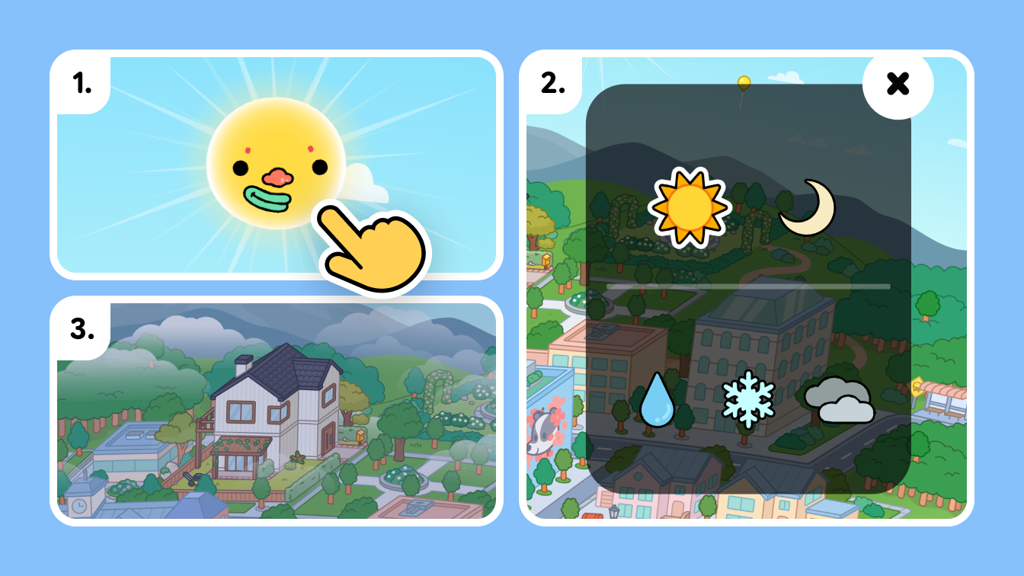
So, now you can change the weather in Toca Boca World by simply clicking the sun/moon. You'll need to ensure that you are on the latest version of the game. If the feature isn't showing for you, you can manually visit your device's app store listing of Toca Boca World and there should be an "Update" button waiting for you.
Now when you click the sun/moon you'll be presented with options to switch the time of day, as well as the weather - everything handily in the same place! Some locations do have default weather so the weather is unable to be changed. So what’s it going to be first?
We also have some great Weather gifts to celebrate this occasion. A duck-themed rain outfit and umbrella to keep you dry when it is raining ☔️ 🦆 as well as some lovely snow globe and thermos to keep cozy indoors when it's snowing!
Just like the weather, some things can be unpredictable and these gifts you don't need to claim, provided you are running the latest version of the app (1.120) they will already be waiting for you on the Post office shelves.
We hope you have enjoying adding some DRAMA to your stories by picking from sun, rain, snow and fog! ☀️ 🌧️ ❄ 😶🌫️